


Google began a shift to Android's Material You design phase last year, and the Pixel 7 Pro is the flagship smartphone purpose-built to make the most of Android 13's personal (and functional) software. Since Google designs both the Pixel hardware and Android software, it has an opportunity to provide deep integration and optimization for its smartphones. But the Pixel was late to the game — the first Pixel devices were released just eight years ago in 2016 — and Google has struggled to take market share from industry giants Apple and Samsung.
At the time the Pixel 6 and Pixel 6 Pro were released, the Pixel lineup represented just two percent of smartphones sold in North America. Fast-forward to a year later, and not much has changed. The advancements brought by the Pixel 6 and 6 Pro were a hit, and some of those features were made available on a budget through the Pixel 6a. Despite the success of Google's last-generation smartphones, the company still holds a tiny fraction of smartphone sales, but it's aiming to change that with the Pixel 7 Pro.
So, does the Pixel 7 Pro make a noticeable impact over past Pixel devices? After spending a week with the device, the answer is – yes. The design and user-experience of the Pixel 7 Pro is definitely reminiscent of last year's Pixel 6 Pro, and that's a good thing. Google has had a year to improve the hardware with an upgraded Tensor G2 chip and the software with Android 13. Though there is still room for improvement, the Pixel 7 Pro is set to be one of the top Android smartphones on the market during the 2022-23 release cycle.
Design & Display: A Much-Needed Refinement

Users have had a full year to adjust to the radical design of the Pixel 6 Pro, which laid the groundwork for the Pixel 7 Pro. In fact, the two smartphones look similar enough that some might confuse the Pixel 7 Pro and Pixel 6 Pro when they are side-by-side. The Pixel 7 Pro features the same general design language of the Pixel 6 Pro, accentuated by the camera bar that extends across the width of the device. While it isn't the most appealing design, the camera bar can easily blend in with a protective case installed. It's also important to note that the camera bar has a functional use as well, stabilizing the device and making it easier to use on a desk or table, unlike the iPhone 14 Pro and its massive camera bump. The smartphone continues to feature an IP68 water resistance rating like its predecessor.

The glossy glass back is made out of Edgeless Corning Gorilla Glass Victus and has a fingerprint-resistant coating, but that doesn't seem to help. The company sent over the Obsidian color of the Pixel 7 Pro for review, and it's a fingerprint magnet. Fingerprints will probably be less visible on the lighter Snow and Hazel colors. But a more serious concern is the slipperiness of the smartphone. While the phone feels secure when held, the same can't be said when it is placed in a pocket. Again, this can be solved quite easily by putting a case on the smartphone.
The entire border of the Pixel 7 Pro features a polished aluminum frame, fixing one of the biggest issues with the Pixel 6 Pro's design. On the previous model, there was a large plastic window on top of the device's frame to enable mmWave 5G connectivity. There's still a window on the Pixel 7 Pro to make mmWave support possible, but it blends in with the rest of the smartphone's aluminum frame nicely. The other issue with the Pixel 6 Pro's design — a camera that audibly shook after even the slightest movements — has unfortunately not been resolved on the Pixel 7 Pro. You can clearly hear the camera shake, which frankly makes the flagship phone feel cheap. As soon as you hear it for the first time, it's almost impossible to ignore.
Buttons on the Pixel 7 Pro follow different placements than last year's Pixel 6 Pro, and they definitely take some time getting used to. The power button is where you'd usually expect the volume rocker to be, causing quite a few accidental presses during the early days of testing. This was easy enough to get used to, but the power button can be difficult to press as well given its smaller size.

The Pixel 7 Pro has a 6.7-inch display, which is equivalent to the larger iPhone 14 Pro Max. Pleasantly, the phone feels surprisingly compact for its size. The screen is largely unchanged from the Pixel 6 Pro, with the noticeable difference being the display's brightness. The Pixel 7 Pro is capable of 1,000 nits brightness during HDR and can go all the way up to 1,400 nits peak brightness. It isn't quite as bright as the panel on the iPhone 14 Pro, but it gets the job done.
The panel uses a QHD+ LTPO OLED display with a resolution of 1,440 x 3,120. The phone uses FHD+ resolution by default to save battery life, but this can be easily changed in the smartphone's settings. It would have been nice to see this option in the initial setup process, because it's possible users will have their Pixel 7 Pro set to 1080p without ever enabling the full resolution. The display also uses Smooth Display to crank the screen's refresh rate up to 120Hz during use, and lower it down to 60Hz when content stagnates. The Pixel 7 Pro's display is bright, sharp, and snappy. It has great colors, but they might seem artificial out of the box. That's because of an Adaptive color mode that brightens the display's color and creates more contrast, which is enabled by default. Color purists might prefer using the Natural color mode found under the display settings.
Performance & Battery Life: The Tensor G2 Chip Debuts

The Pixel 7 Pro is powered by Google's Tensor G2 chip, making it one of the few smartphones to ditch Qualcomm and MediaTek in favor of in-house silicon. The performance gains are centered around the company's machine learning and artificial intelligence technology, which power a variety of features impacting everything from call quality to the camera system. The Pixel 7 Pro ships with the same 12GB of LPDDR5 RAM as last year's Pixel 6 Pro, and can be configured to 128GB, 256GB, or 512GB of storage.
There's also a Titan M2 security chip, which Google says will add extra layers of security to Pixel smartphones. Google is finally bringing Face Unlock to the Pixel 7 Pro, a feature that is missing on its predecessor. The phone can be locked with a passcode, pin, or pattern and has Dual Biometrics Unlock. This method uses both Face Unlock and Fingerprint Unlock, and picks the quickest method for different situations. If you're wearing gloves or your hands are dirty, Pixel 7 Pro will use Face Unlock. If you're wearing a mask, it'll use Fingerprint Unlock. The fingerprint sensor is under the display, and works flawlessly. Later this year, Google One will provide a free VPN to Pixel 7 Pro users, and the device will get at least five years of security updates and three full software updates.
Paired with the 120Hz display, the Pixel 7 Pro feels downright fast. It holds up to the Galaxy Z Fold 4 and iPhone 14 Pro during daily use, and those devices are powered by the Snapdragon 8+ Gen 1 and the A16 Bionic, respectively. Sending text messages, scrolling through social media, and working on Google Drive documents and spreadsheets is no problem for the Pixel 7 Pro. However, high-performance gaming might not be best fit for the smartphone. After installing Fortnite from the Epic Games store, the battle royale experience was less than ideal at high settings. The frame rate hovered between 20 and 30fps when moving around in the game, with frequent stutters. The game was also capped at 30fps in settings, but developers might just need to update their games to maximize the Tensor G2's potential. However, less graphics-heavy mobile games set to medium or low settings should run fine on the Pixel 7 Pro, and there's also the option of cloud gaming — just not from Google Stadia.


Battery life on Pixel 7 Pro lasts all day, and the 5,000mAh cell is rated for over 24 hours during normal use. With Battery Saver and Extreme Battery Saver, it can stay on for up to 72 hours. On the first day of battery testing, the Pixel 7 Pro started off at 100 percent at 1:30 p.m. By 5:36 p.m., the device had drained to just 67 percent. It was used at full brightness, with no low power modes enabled, and finished the day at 12:18 a.m. with 17 percent of battery remaining. The following day, the Pixel 7 Pro was unplugged with a full charge at 9:15 a.m. After a few phone calls, 5G data use, and hours of screen time the battery drained to 63 percent by 1:22 p.m. Battery Saver was enabled at 4:38 p.m. after another long phone call, with the device at 22 percent. It lasted through 10 p.m. with seven percent battery remaining at that time. The Pixel 7 Pro supports 30W fast wired charging (and wireless charging too). Unfortunately, Google doesn't include a charger in the box.
Software: Material You Shines

The Pixel 7 Pro ships with Android 13 software, highlighted by Google's Material You design language. With Material You, users can choose a color palette that is reflected across the entire system. There are now 16 color options, and these will affect the colors of some applications, controls, and native applications. Support for Material You app icons isn't great — Google's own Watch app isn't supported — but the implementation is fantastic. Colors are viewed in animations, which have a flow to them that feels natural and engaging. For example, when the power button is pressed to lock the device, the entire screen's color moves towards the button. When a charger is connected, an effect goes through the entire screen to show the Pixel 7 Pro is being charged. Google guarantees that the smartphone will receive at least five years of security updates, but unfortunately, it limits the OS updates to just three.
Camera: Great Photos, New Tricks

The Pixel series has had a great reputation for excellent cameras backed by machine learning and AI, and the Pixel 7 Pro is no exception. It has the same main camera as last year — a 50MP shooter with a 1.2μm pixel size, f/1.85 aperture, and 1/1.31-inch sensor size.


The 12-megapixel ultra-wide camera now has autofocus and a wider field of view. The telephoto camera is still 48-megapixels, but now uses the same advanced quad-bayer system as the main sensor. There's a 10.8-megapixel front camera — slightly less than the Pixel 6 Pro's 11.1-megapixel front camera — with fixed focus.


Each camera was excellent on the Pixel 7 Pro, and the main sensor definitely captures bright images better than the iPhone 14 Pro. The most impressive feature was Super Res Zoom, which maximizes each sensor's potential to take a great shot. When taking a photo between 2.5x zoom and 5x zoom, a photo from both the wide and telephoto cameras will automatically be captured and combined into a better photo. Digital zoom goes all the way up to 30x zoom, as seen in the image samples above. Both pictures were taken from the exact same spot, showing a comparison between the main camera's 1x and 30x zoom.


Some camera features are only available on the Pixel 7 Pro, due to the better camera system and the Tensor G2 chip. One of those is Macro Focus, which captures more detail up close. There's also Night Sight, which lengthens the camera's exposure time to produce a well-lit photo in dim lighting conditions. In certain conditions, this turns on automatically, but it can be also enabled manually in the Camera app. Portrait mode and autofocus work great on the Pixel 7 Pro, separating the subject from its background just as well — if not better — than its competitors. There's a similar Cinematic Blur for video, and recording looks colorful and bright with 10-bit HDR video capture.


Tensor G2 uses machine learning and AI to improve longstanding Pixel features, like Magic Eraser and Real Tone. It adds a potential game-changing feature in Photo Unblur, which adds surprising clarity to some blurry photos. Some photos will work better with Photo Unblur than others, but the good news is that this will work with any photo stored in a user's Google Photos library. It'll resolve issues like moderate motion blur, camera shake, and visual noise in photos.
Should You Buy The Pixel 7 Pro?
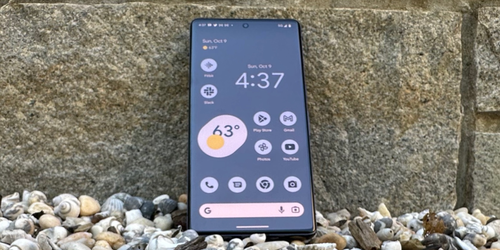
The Pixel 7 Pro undercuts most flagships with an $899 starting price that can be brought down with trade-in deals. It isn't for everyone, and it has a few flaws that can be minor annoyances in daily use. But it's also the most well-rounded Android smartphone at this price point, and is undoubtedly the smartphone designed for Android 13's Material You. The hardware is specifically designed in mind for the software it runs, which can't be said about a lot of Android phones. Pixel 7 Pro offers solid performance, great battery life, and some of the best smartphone cameras. Google's main competition is with itself, since the base Pixel 7 starts at just $599 and is missing only a few Pixel 7 Pro features. For those who can afford the extra $300 though, the Pixel 7 Pro is the smartphone to get.
Source: Google
