


iOS 16's Live Activities provide real-time information on the iPhone's Lock Screen or Dynamic Island, but users can increase the rate a Live Activity refreshes with a toggle in the Settings app. With the iOS 16.2 update, Apple introduced new features like customizable always-on display settings, support for Apple Music Sing, and end-to-end encryption with Advanced Data Protection for iCloud. But the company also added an under-the-radar setting that allows users to view more frequent updates on their Lock Screen with Live Activities.
For users who value Live Activities more than battery life, Apple has added a 'More Frequent Updates' toggle in the Settings app, as first pointed out by MacRumors. There is no system-wide setting for Live Activities, so users will have to manually enable or disable the feature for each app. Start by opening the Settings app and choosing the app that will be used with Live Activities. If an app has recently added support for Live Activities, check that it is up-to-date before navigating through the app's settings. Developers have to manually allow frequent updates for Live Activities, so not all apps that support Live Activities will offer the 'More Frequent Updates' setting.
Enable Frequent Updates For Live Activities By App
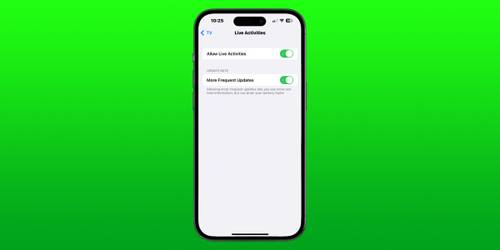
After choosing an app that supports Live Activities — a native example is the Apple TV app — tap the app's settings tab. Then, scroll down to the 'Allow App To Access' section and look for 'Live Activities.' If there is a toggle next to the 'Live Activities' text, the app does not support more frequent updates. However, apps that do support the additional updates will have a 'Live Activities' tab in place of the toggle.
Tap the 'Live Activities' tab on a compatible app to open up a new settings page that houses the 'More Frequent Updates' toggle. "Allowing more frequent updates lets you see more real time information, but can drain your battery faster," text reads underneath the option. If the toggle next to 'More Frequent Updates' is green, the feature is already enabled. If it's grayed-out, tap the toggle to enable frequent updates for Live Activities.
Constantly refreshing a Live Activity uses more power than would typically be required to show the date and time on an iPhone's Lock Screen. Since a Live Activity can remain active for up to eight hours — and can be displayed on an iPhone's Lock Screen for an additional four hours — this can be a significant battery hit. Live Activities have the potential to show critical and time-sensitive information at a glance, but their convenience comes at the expense of battery life. With the frequent updates setting, iPhone users can choose whether to prioritize Live Activities or battery life for individual apps.
Source: MacRumors
