


Smarter Playlists for Spotify is a third-party app that can be used to create very specific playlists based on a user's listening history on the platform. Spotify already has a pretty intuitive recommendations algorithm that provides people with auto-generated music playlists they may enjoy listening to, without the need to build them from scratch. However, for users who are looking for a bit more customization, a third-party app or program can help.
There’s one particular website that makes composing complex Spotify playlists easy to accomplish. While the process requires a bit more effort, focus, and preparation to actually get through, at the end of it, the results produced should be highly accurate and relevant to the themes chosen. Users can pick Spotify albums, artists, genres, or playlists to use as the foundation for a new song compilation, filter songs according to a myriad of track attributes, and even pick a date range to ensure that hits from that particular period are prioritized.
To take ‘Smarter Playlists’ for a spin, access the website on a computer's web browser to see the platform’s interface better — hit ‘Login To Get Started,’ and grant access to Spotify. Next, click ‘New Program’ to get a new smart playlist started. On the left panel, program components are grouped into ‘Sources’, ‘Filters’, and ‘Conditionals,’ among others. Expand all sections on the sidebar and click on one component once to add it to the program, and twice to get more information on what it actually does to produce tracks for the new playlist.
See ‘Smarter Playlists’ In Action
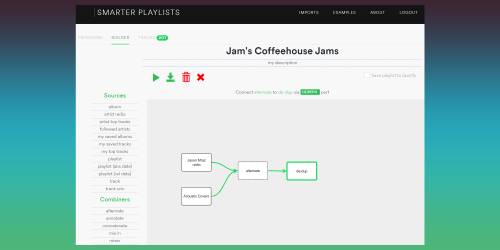
Connect each component by clicking on it and pressing the space bar — linkable components will automatically be joined. To connect a component to the red input of a conditional filter, press the shift and space bars. To run the program, hit the last component and press the run button. Users can test and tweak different parts of the program and hit the run button at every step to see and refine the song results it produces.
Not sure where to start? Here’s how to generate a smarter coffeehouse playlist by combining two compilations. First, under ‘Sources,’ click on ‘artist radio,’ then double-click on the component to add ‘Jason Mraz’ under ‘name.’ Next, hit ‘playlist’ and type ‘Acoustic Covers’ in the name field and ‘Spotify’ as the user. Then, add ‘alternate’ from under ‘Combiners’ and click one of the initial song sources, hit ‘alternate’ again, then follow the onscreen instructions on connecting the components (for ‘alternate,’ type ‘g’).
Do the same for the second source. Lastly, add ‘de-up’ from ‘Filters’ and connect ‘alternate’ to it to ensure that no song is played twice. Run the program and go to the ‘Tracks’ tab to see the final playlist. Once satisfied, go back to ‘Builder,’ check the ‘Save playlist to Spotify’ box, then run the program. The new playlist should show up in the Spotify app library.
There’s a learning curve to using Smarter Playlists, but once a user gets the hang of it, it can get quite addictive trying to come up with good playlist program formulas. If at any point there’s some confusion on using the service, the FAQ page is a pretty good place to regain bearings as well as see a nifty guide of keyboard controls for some components. The developers have also posted sample playlist programs that users can mimic, or outright click and import into their own Spotify account.
