


The Meta-owned online messaging platform WhatsApp has released a new feature that helps users link and manage several groups in one place. It is called WhatsApp Communities and is available for all users in the latest app version on iOS and Android. Although WhatsApp rolled out the feature in November 2022, it has been under development for more than a year.
The first reference to WhatsApp Communities dates back to October 2021, when XDADevelopers found the feature's name in the code of WhatsApp's beta version 2.21.21.6. Then the next month, WhatsApp updates tracker WABetaInfo also reported that the platform is working on Communities, a feature allowing users to control multiple groups.
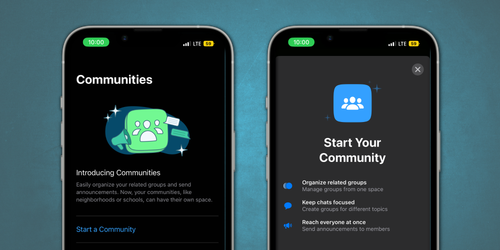
As the official blog post describes, "Communities like neighborhoods, parents at school, and workplaces can now connect multiple groups under one umbrella to organize group conversations on WhatsApp." To elaborate, Communities are like a parent group for several sub-groups: a collection of WhatsApp groups that could share a common subject or topic of discussion. To create a WhatsApp community group, head to the app and "tap on the new communities tab at the top of your chats on Android and at the bottom on iOS." For the first time, the app will show an introduction prompt about what Communities are, along with an option to 'Start a community.'
Manage Multiple WhatsApp Groups At Once By Creating A Community
On the following screen, create a community name and description. Then tap the 'Next' button in the top right corner and add existing groups or create new ones. Notice how the community's name comes up under the 'Groups in this Community' as an announcement group, which means that creating a WhatsApp community links several groups to an announcement-only group. Once all the required groups are added, tap on 'Create' in the top right corner, and that's it. WhatsApp will then redirect to the Community group's info page. From the info page, admins can manage the participant groups and their members, add more groups and change the profile picture of the community group.
The community will appear with its name in the chat section, just like regular groups do, and in the dedicated Communities section. After creating the community, admins can use it to send announcements to all the participant groups at once. It is essential to mention that only admins can send messages through the main community group. Nevertheless, the community members can have regular conversations in their groups and join other groups by sending requests to the admin. This way, they can stay connected with everyone and get the information they need within seconds. The main idea behind the WhatsApp Communities feature is to organize related groups, keep chats focused and reach a large number of participants at once (up to 5,000).
Source: WhatsApp, XDADevelopers
