


So you want to cheat at Balatro. The pseudo-poker roguelike has rightfully become one of the most popular games of 2024, earning a Game of the Year nomination at The Game Awards. One of the factors that makes it so engaging is its difficulty. It's difficult to win some of the high-scoring Blinds, difficult to unlock all the Jokers, and monumentally difficult to get through all the achivements. Cheats can help with all that and more.
Either way, it's important to note that there's no built-in cheat feature for Balatro. If you want to do it, you'll have to mess around in the game's files a bit. Thankfully, it's an easy enough process that almost anyone can pull it off, and it's almost impossible to mess up. (And even if you do, there's an easy fix.) Plus, activating cheats like this doesn't disable achievements. Read on to learn everything you need to start cheating in Balatro by accessing the debug menu.
How To Use Cheats In Balatro
Unzipping Balatro's Files

The first thing you'll need to start using cheats in Balatro (Screen Rant's best indie game of 2024) is a piece of file archiving/compression software like 7-Zip. 7-Zip is totally free, and is the only additional install you'll need. Unfortunately, this method only works on PC; console and mobile players don't have the option.
Next, open Steam and find Balatro in your library. Right-click on it, click Manage, and then click Browse local files. Find the Balatro.exe file, and click 7-Zip to open the sub-menu, where you'll select Open archive (the first one).
If you don't see 7-Zip in the initial menu, then click the "Show more options" tab at the bottom to open a larger menu. 7-Zip should appear there; if it still doesn't, confirm it's installed, then try restarting your PC.
You'll now see all of Balatro's files in the 7-Zip window. For our next trick, we'll be opening and modifying one of those files to unlock the debug menu and enable cheats.
Modifying Balatro’s Files
Now, you should see an array of files before you in the 7-Zip window. Click on the folder called “engine,” and find a file named controller.lua inside. Click it and drag it to another folder on your computer - Desktop works - and open it from there using Notepad. Press Ctrl + F to open the search menu, where you should type in “if not _RELEASE” (or just copy and paste it from here, without the quotes).
Here, you'll see a line that reads “if not _RELEASE_MODE then.”. Simply delete the word “not,” along with one of the surrounding spaces, then save and close the file. Drag and drop that file back into the 7-Zip window - you should get a pop-up that asks if you want to copy files to the archive, and click OK. You can now delete the copied controller.lua file from your Desktop. Just like that, your file modding is done.
What you've done here is unlock an important developer tool: the debug menu. Now, all you have to do is hold Tab while playing Balatro to open the debug menu and access cheats, which will allow you to take the guesswork out of its gambling.
All Cheats & What They Do
List Of Balatro Cheats


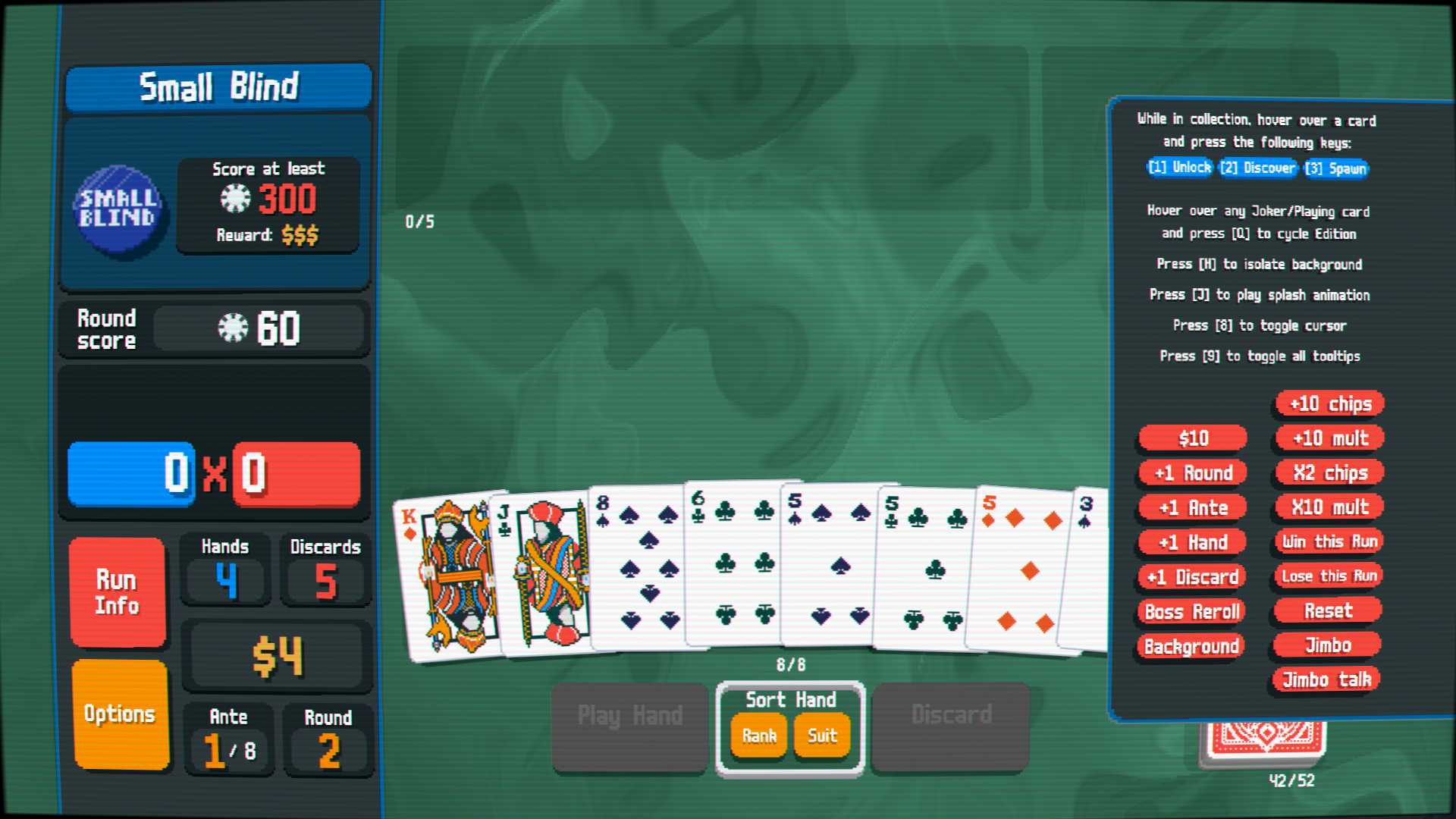
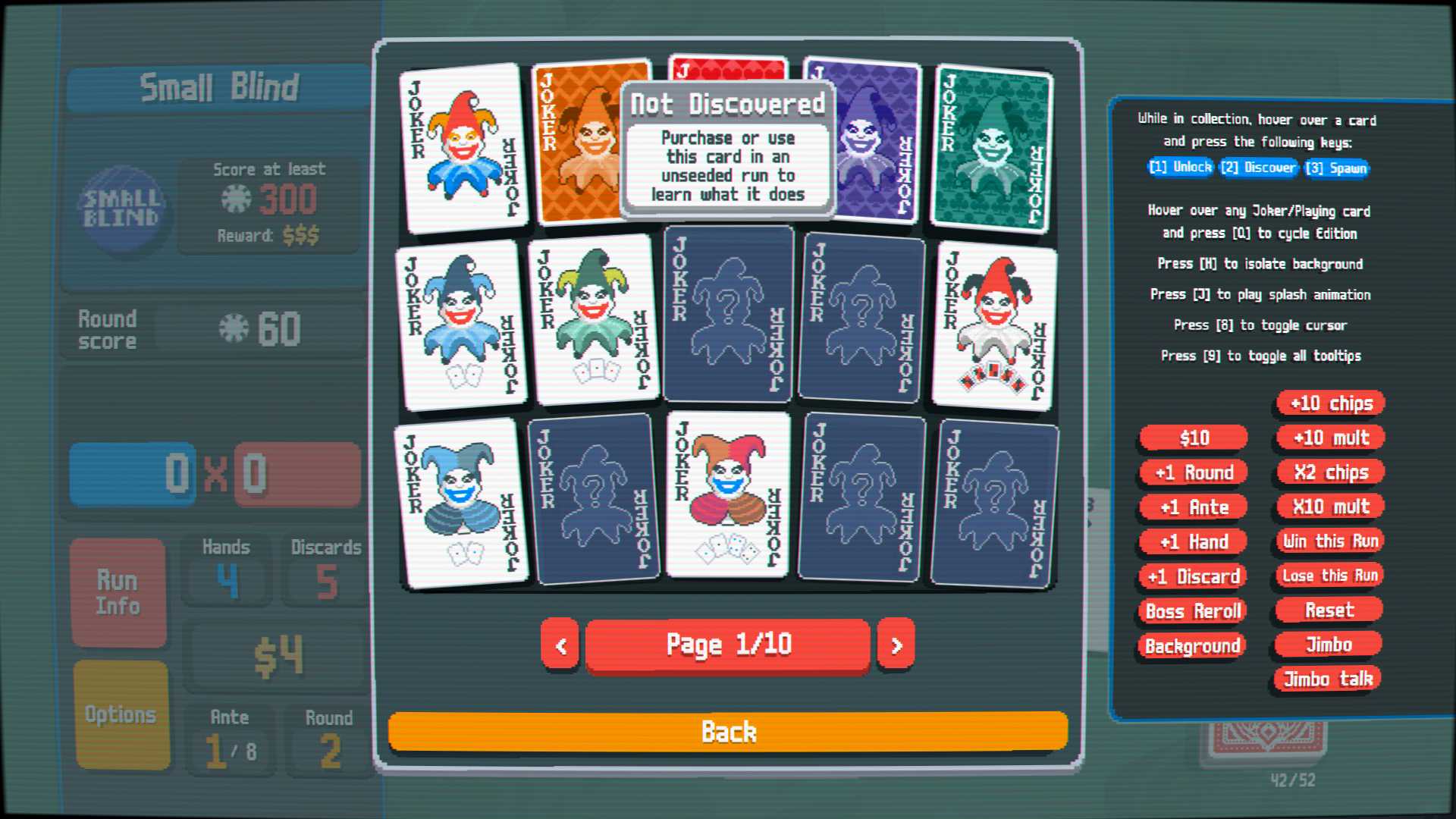
Hold Tab anywhere in-game, and you'll get a simple menu of cheats. Here's a list of what every single Balatro cheat does, and how to employ it. Note that the cheats that list keys on your keyboard require you to press that key to activate them, whereas the rest can be clicked like buttons in the debug menu.
|
Cheat |
Effect |
|---|---|
|
1 |
Unlocks an item from the Collection (cards, decks, vouchers, packs, seals editions, etc). Hover over the item in the Collection with the debug menu open and press 1. |
|
2 |
Discovers an item from the Collection. |
|
3 |
Spawns an item from the Collection. |
|
Q |
Hover over any card to cycle its edition (Base, Foil, Negative, etc.) |
|
H |
Isolate background (all cards and UI disappear). |
|
J |
Play splash animation. |
|
8 |
Toggle show/hide cursor. |
|
9 |
Toggle show/hide tooltips. |
|
$10 |
Immediately adds $10 to your bank. |
|
+1 Round |
Advances the game by one round. |
|
+1 Ante |
Advances the game by one Ante. |
|
+1 Hand |
Grants you one extra hand. |
|
+1 Discard |
Grants you one extra discard. |
|
Boss Reroll |
Changes the Boss Blind for the current Ante. |
|
Background |
Changes the typical wavy background to a neutral green. |
|
+10 Chips |
Adds an extra 10 chips to your current hand. Must use with cards selected. |
|
+10 Mult |
Adds an extra 10 mult to your current hand. Must use with cards selected. |
|
x2 Chips |
Doubles the chips earned by your current hand. Must use with cards selected. |
|
x10 Mult |
Multiplies the mult of your current hand by ten. Must use with cards selected. |
|
Win this Run |
Automatically marks the current run as a win. |
|
Lose this Run |
Automatically marks the current run as a loss. |
|
Reset |
Removes any extra chips/Mult you've added using the debug window. |
|
Jimbo |
Causes Jimbo the Joker to appear on-screen. |
|
Jimbo talk |
Plays the Jimbo talking sound effect. |
How To Disable Cheats In Balatro
Okay, so you've had your fun and want to go back to playing Balatro fairly. Removing cheats is extremely easy, and can be done entirely in Steam. Right-click on Balatro in your game's library, then open the Properties menu. Click on Installed files, and then select Verify integrity of game files. Steam will process this for a moment; wait until the loading bar is done, and close the window. You should now be able to reopen Balatro without access to cheats, if not with a clear conscience.
Source: 7-Zip




-
 OpenCritic Reviews
- Top Critic Avg: 92/100 Critics Rec: 100%
- Released
- February 20, 2024
- ESRB
- E10+ For Everyone 10+ // Gambling Themes
- Developer(s)
- LocalThunk
- Publisher(s)
- Playstack
- Engine
- LÖVE
Developed by LocalThunk, Balatro is a deck-building poker roguelike game released on all main modern consoles and PCs in 2024. Set up as a unique fusion of deck-building and poker, Balatro tasks players with trying to win escalating games of poker where they can purchase joker cards with unique effects to help win and conquer their opponents.

